API and webhooks: connect Pochuto to your CRM
For your CRM to create a personal link after a visit and learn about a customer complaint right away, it needs an API key and a webhook. Both are set up in the dashboard, in the "API and webhooks" section of your profile, and are available on the Business plan
What it is and who needs it
The API is the way your CRM, accounting system or own service talks to Pochuto without you: it creates a personal link, reads statistics or complaints. A webhook works the other way round: when something happens in Pochuto, we send an event to the address of your server
A typical case: an administrator closes a visit in the CRM, the CRM creates a personal link and sends it to the customer. If the customer leaves a complaint, a webhook creates a ticket in your system right away. A developer or contractor usually sets the integration up: this page is for the owner, and the technical description of the methods is in the developer documentation
Do not offer customers a reward for a review, by hand or through an integration. Google policy forbids paid and incentivized reviews, and a profile that collects them can be restricted
Which plans include it
- Business - everything without trial limits: keys and webhooks work in full
- Trial - works in full, but with limits meant for testing an integration: up to 2 keys, up to 2 webhooks, 100 webhook deliveries per day, 20 requests per minute for reading and 5 for writing. The limits go away after you pay for Business
- After Business ends - for 14 days keys can only read, then the API returns an error. Webhooks stop being sent right away, and new events (and ones not yet sent) stay in the log marked "Access ended"
- Start - no API or webhooks. The dashboard section offers to switch to Business
If the Business payment fails, keys keep reading data but cannot change it until the payment is updated. Webhooks are still sent as usual. For payments, see the billing section
API keys
Keys are created in the dashboard: Profile → "API and webhooks" (address /profile/api), the "API keys" card. The "Create key" button asks for a name (for example, the name of your CRM), access rights and, if you want, a location
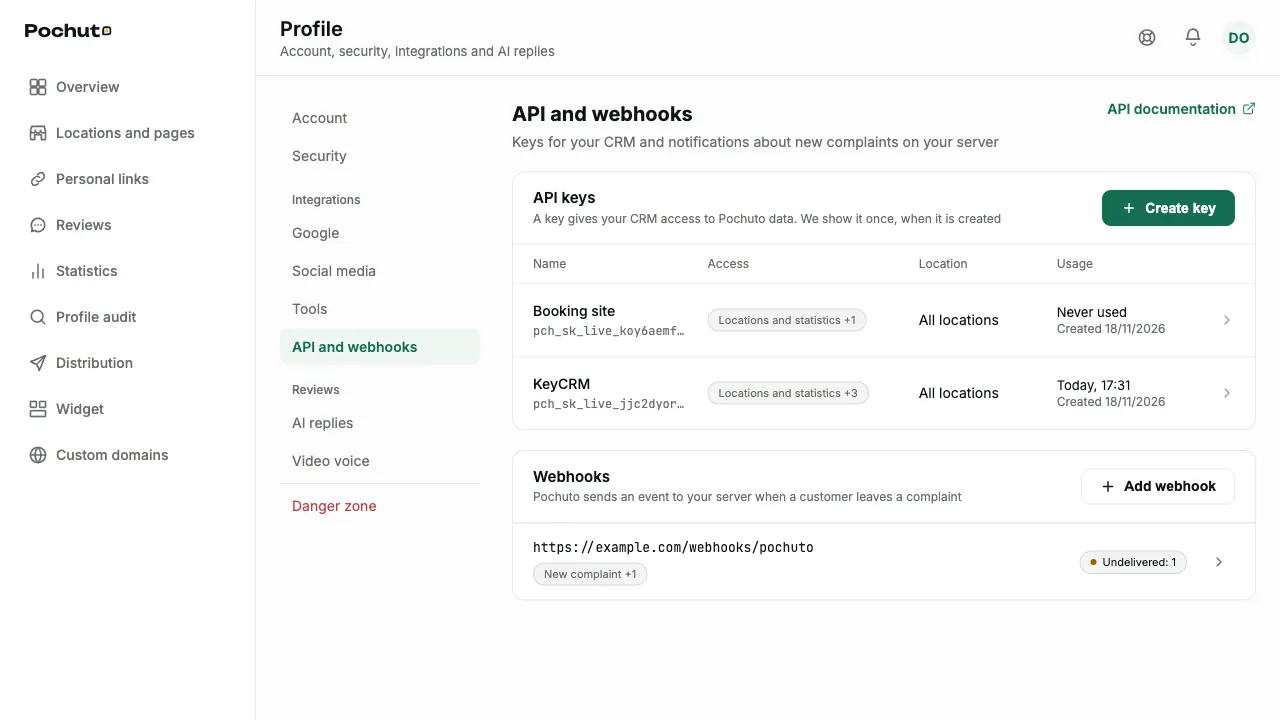
A key is shown only once, right after it is created. Copy it into the CRM settings before closing the window: afterwards the list keeps only the start of the key, its creation date and the date of last use. If you lose it, create a new one and revoke the old one
Access to specific data
A key gets only the rights you choose and nothing more. If it tries to do something else, it is refused. What each right means
- Locations and statistics - see your locations, review pages, placements, staff and funnel numbers for a period
- Links: view and Links: create - search personal links, create new ones or deactivate existing ones
- Complaints: view and Complaints: change status - read complaints from the form and mark them as processed
- Google reviews: view and Google reviews: reply - read public reviews from the connected Google profile and publish replies to them. Replying is a separate right: without it a key only reads
- Webhook subscriptions (webhooks:manage) - create and delete webhooks with the key itself, without the dashboard: this is how integration platforms such as Zapier and Make work. Details are in the webhooks section below
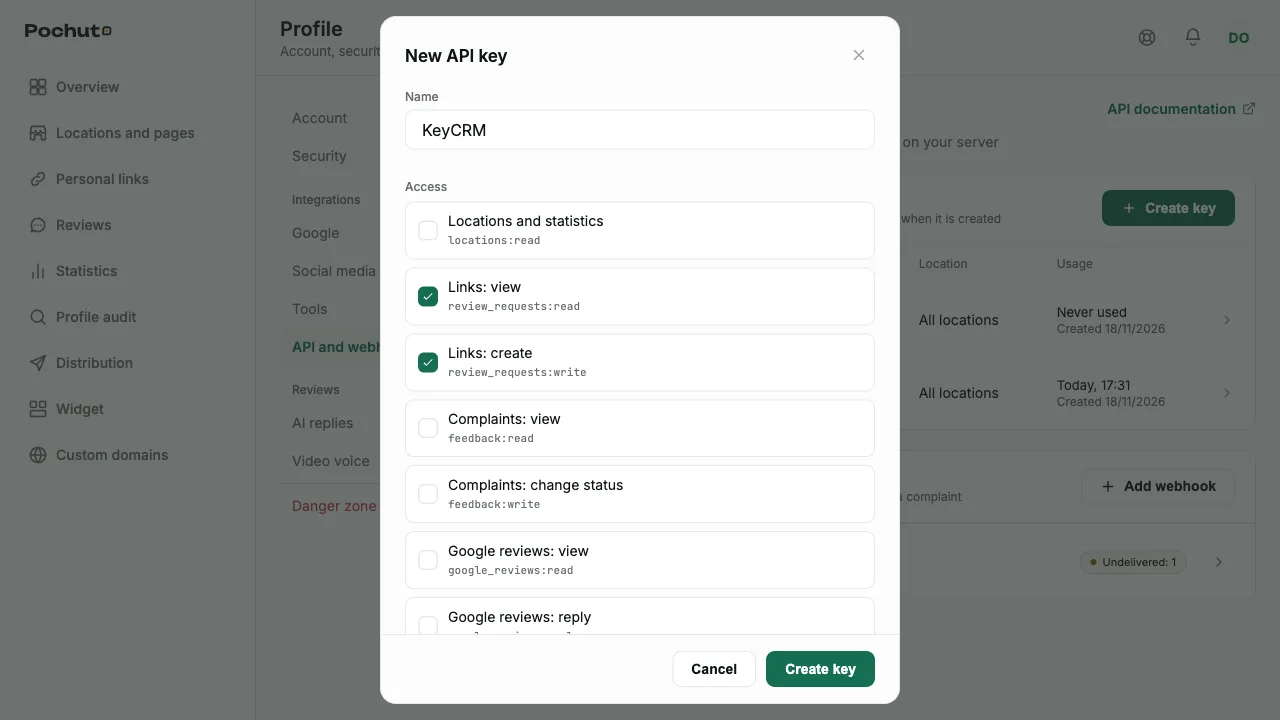
One location or the whole account
By default a key sees all locations of the account. If you pick one location, the key works only with its data: other locations do not exist for it. For a chain it is convenient to issue a separate key for each site. The location cannot be changed after the key is created
Customer name and phone
A key receives a customer's name and phone only with the separate option "Pass the customer's name and phone". You can turn it on only after confirming: a system with such a key can store and pass on your customers' contacts, and you are responsible for it. Without this option responses contain no names or phones, and searching complaints or links by name or phone is rejected
The name, rights and access to contacts can be changed later in the key settings: the key itself stays the same, and changes apply from the next request. At least one right must stay
Revoking
"Revoke key" in the key settings turns it off immediately and for good: the system that uses it stops working. A revoked key cannot be restored, you need a new one. Only the owner manages keys, in the dashboard; a key cannot create or revoke another key
What you can do through the API
- Locations and pages - read the list of businesses, review pages, placements and staff; the staff list itself cannot be changed through the API
- Statistics - the same funnel numbers as in the Statistics section: views, rating choice, clicks to Google, submitted complaints. There are no individual customers in statistics
- Personal links - create a link with the customer's name, a staff member and your own internal id, find it by id or status, deactivate it. Repeating a request with the same idempotency key does not create a second link, and the key is valid for 24 hours. A link made through the API takes the customer the same way as one made in the dashboard
- Complaints - read complaints from the form and switch the status between "processed" and "new". The status matches what you see in reviews, and the Telegram reaction is set the same way as from the dashboard
- Google reviews - read reviews of the connected Google profile and publish a reply (up to 4096 bytes). Replies and reviews contain no Google author name or photo. Without a connected profile there are no reviews, so the list is empty. You see the "Google is not connected" error only when replying to an already imported review after the profile was disconnected
Limits on regular Business are 120 requests per minute for reading and 30 for writing per key; keys of one account do not get in each other's way. Plans, payments and subscription management are not available through these methods
Webhooks
A webhook is the address of your server to which Pochuto sends an event. It is set up in the same profile section, in the "Webhooks" card, with the "Add webhook" button
Which events arrive
- New complaint - a customer submitted the private form. A complaint from a customer who chose "Google anyway" also counts, if they left text or a phone number
- Personal link used - a customer used a one-time link: submitted a complaint or went to Google. Merely opening the page does not count. The event arrives once
- New Google review - an import found a new public review of a location. The first review import of a location creates no events, the same as Telegram notifications. The body has no author name or photo
Funnel events (page views, rating choice) are not sent to webhooks: you can read them through the API in statistics
How to add an address
Enter the server address and pick the events, at least one. The address must be https and reachable from the internet: no login or password in the address, port 443 (the dashboard rejects any other port). Addresses in a private network are not accepted, and a redirect response counts as a failed delivery
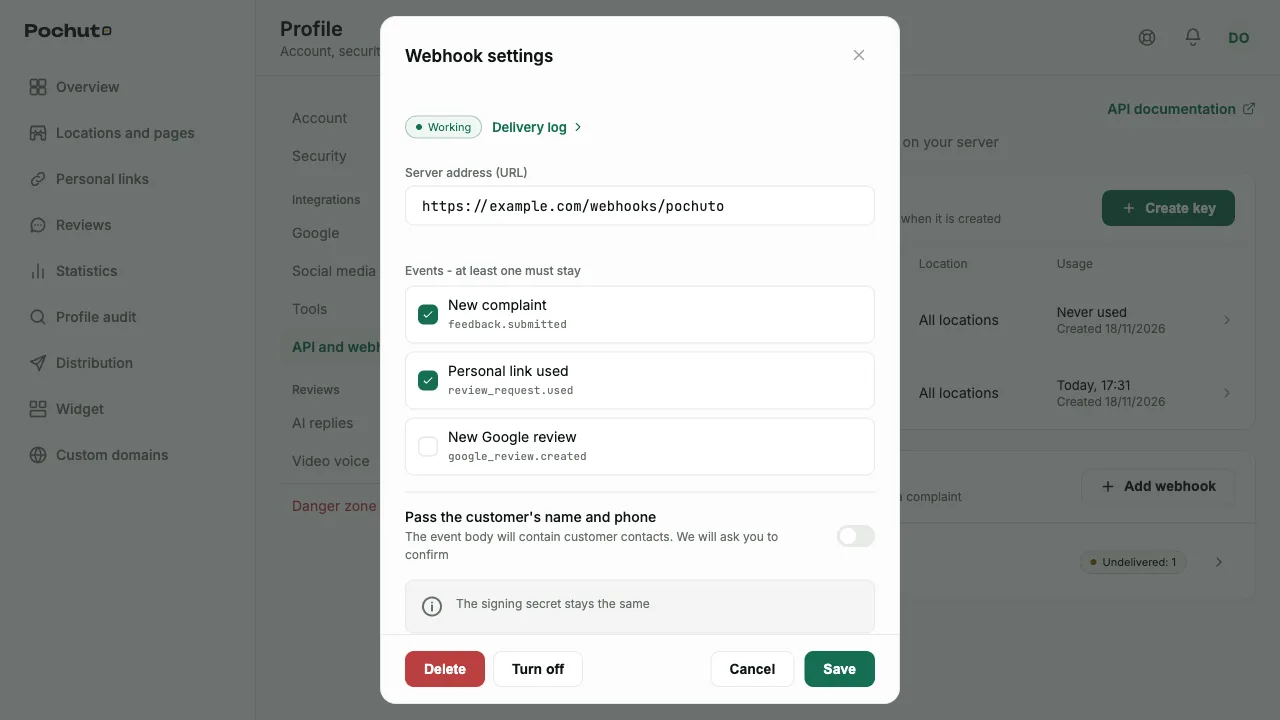
The signing secret is shown only once, after the webhook is added. Your server uses it to check that Pochuto sent the event. Save it in your server settings: if you did not copy it, you will have to delete the webhook and add it again. How to verify the signature is described in the developer documentation
Name and phone in events
By default an event contains no customer contacts. Sending the name and phone is turned on separately for each webhook and needs confirmation, as with a key. If you change the server address to a different host, the consent is removed: contacts are not sent until you confirm the permission for the new address. If you turn the option off, the next events go without contacts
Delay, retries and the log
An event usually arrives within a minute. If your server does not answer with success (2xx) within 10 seconds, we retry the delivery with a growing pause, up to 8 attempts in 24 hours. After the last failed attempt the event is marked as undelivered
Everything is visible in the webhook's "Delivery log" (a button in its settings): the event, your server's response, time, number of attempts and state. Records are kept for 30 days. An undelivered event can be sent again with the "Send again" button. The log contains no event bodies or secrets
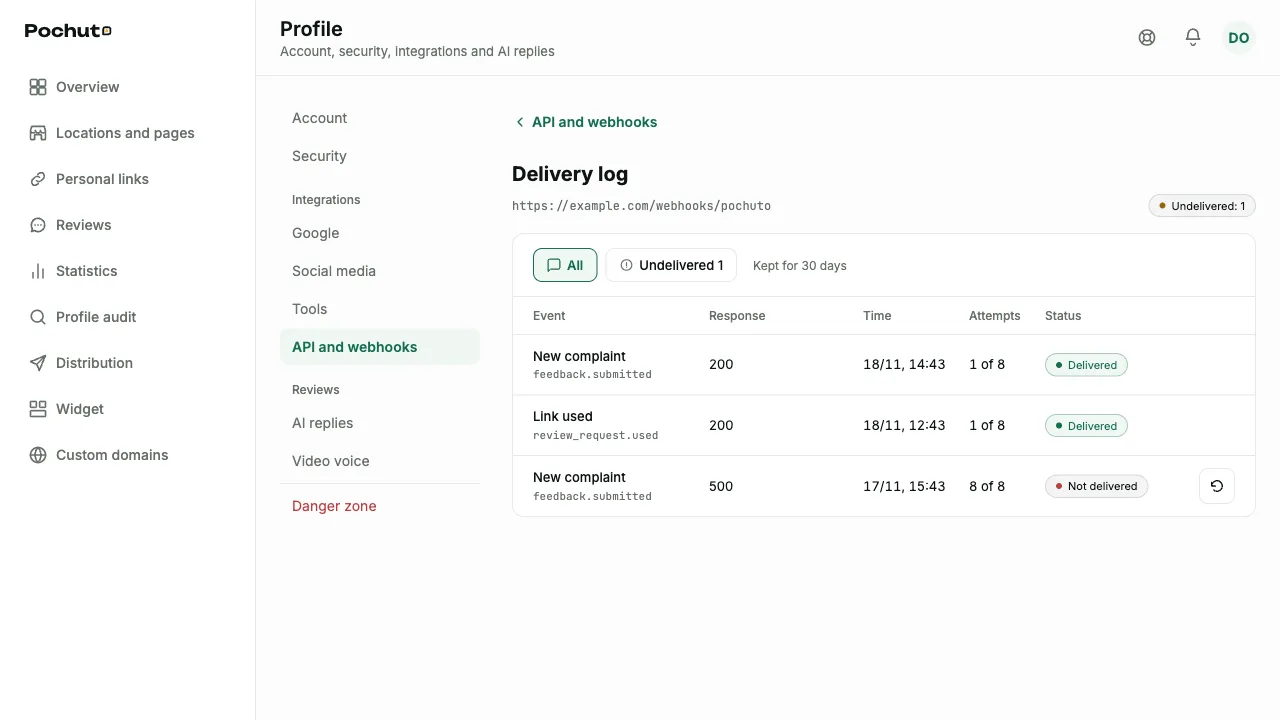
Events missed during an outage are not sent on their own: after you fix the server, send them from the log by hand
Subscribing with a key
Integration platforms (Zapier, Make) create and delete webhooks on their own, with a key that has the Webhook subscriptions right (webhooks:manage). A POST /public/v1/webhooks request with an address (url) and a list of events (events, at least one) returns 201 with id, url, events, secret and createdAt. The signing secret is shown once, in this response: it cannot be fetched later, except in a repeat with the same Idempotency-Key (below). The address is checked by the same rules as in the dashboard
- Customer contacts are not included. The consent field for passing name and phone is an extra field in the request, and the API answers 400. You turn consent on in the dashboard, with confirmation: until then events go without contacts
- A key bound to a location receives only that location's events
- Deleting is DELETE /public/v1/webhooks/{id} with a 204 response; repeating the request also returns 204. A subscription from the dashboard, from another key or from another account, like a non-existent ID, returns 404 and is not deleted
- A key without this right gets 403
- Repeating a request. The Idempotency-Key header is optional. If the same key repeats a request with the same Idempotency-Key and the same body within 24 hours (a platform retries after a network failure), the API returns the same subscription with the same secret (201) and does not use the limit. The same value with a different body gives 409 with the code idempotency_conflict. The Idempotency-Key value is shared with personal link creation by the same API key. If the subscription was deleted in the meantime, the repeat creates a new one
- Limit - up to 10 subscriptions created by keys on the trial and up to 50 on a paid plan. Above the limit the API answers 403 with the code plan_limit_reached and a limit field. A deleted subscription frees its place. Webhooks added in the dashboard do not count toward this limit, and key subscriptions do not use up the 2 webhooks of the trial
- Revoking a key deletes its subscriptions: events stop arriving and they disappear from the dashboard. Webhooks from the dashboard and from other keys are not affected
Automatic turn-off
If 3 days in a row all deliveries of a webhook fail, we turn it off and email you. The dashboard shows the webhook as turned off, with a "Turn on" button. Turn it on when your server accepts requests again. On the trial, deliveries above the daily limit are not sent and are marked "Plan limit" in the log
A webhook can be edited (address, events, consent for contacts) or deleted. The secret stays the same when you edit; deleting it erases the delivery log
Developer documentation
The technical description of all methods, error codes, limits and webhook signature verification with an example is on a separate site: developers.pochuto.com. Pass the link to whoever connects your CRM. Hand over the key and the signing secret separately from regular correspondence and never publish them
If an account is deleted, keys do not work during the recovery window and webhooks stay silent; after recovery keys and webhooks work again, but events from that time are not sent. Deletion turns off Business auto-renewal, and recovery does not turn it back on: after recovery, turn auto-renewal on in the subscription screen (the "Resume subscription" button), otherwise the API becomes read-only when the paid period ends. Final deletion erases the keys and webhooks
FAQ
- Do I need a developer to use the API?
- For a ready integration, usually yes: the CRM or service must be able to call the API. You create the key and the webhook in the dashboard yourself, and a developer or contractor pastes them into the settings and adds the signature check
- What if a key ended up in the wrong hands?
- Revoke it in the key settings: it stops working immediately. Then create a new key for your system
- Why does my CRM not see customer names?
- A key or a webhook receives customer contacts only with a separate consent that the owner turns on with a confirmation. Check the "Pass the customer's name and phone" option in the key or webhook settings
- Why was my webhook turned off?
- For three days in a row the server accepted no events. Fix it, turn the webhook on in the dashboard and send the missed events from the delivery log