Google Business Profile: connecting your profile, importing locations and reviews
The Google profile your business is tied to can be connected to the dashboard in one click: it supplies the locations, the exact review link, the hours for notifications, and the Google reviews themselves
Why connect the profile
Without connecting, everything works as it did: you can add a location through the Google location search and paste the review link by hand. A connected profile takes that manual work off you
- The exact link to the review form. It comes from the profile, not from a search or from pasting, so a customer with a high rating lands exactly on your location's form
- Importing locations. Locations from the profile are added as locations together with the name and address - the review page, QR code and link are created automatically
- Hours for notifications. When you choose the notification hours in Telegram, the dashboard fills in the working hours from the profile
- Google reviews in the dashboard and in Telegram. Public reviews appear next to complaints from the form, and new ones arrive in the location's chat. More on this below, in the "Importing Google reviews" section
Pochuto reads the profile and doesn't edit it: we don't change your name, hours, photos or reviews in Google. Connecting the profile and importing locations don't depend on the plan
How to connect
There are two entry points, with the same result. Profile → the "Google" section → the "Google Business Profile" card → "Connect Google Business Profile": the dashboard goes to a Google screen where you choose the account that manages your business profile and allow access. After you return to the dashboard, a toast "Google Business Profile connected" appears
The second entry is onboarding. The first step after sign-up is called "Connect your business" and also starts with the "Connect Google Business Profile" button. After connecting, the dashboard shows the list of locations from the profile - choose the right one, and the name, address and review link fill in by themselves. More about onboarding in the quick start
If you have no profile or no access to it yet, onboarding has a fallback path: "Find the business with search". The location is saved, and you can connect the profile later in the dashboard. Only the import of Google reviews doesn't work without a profile
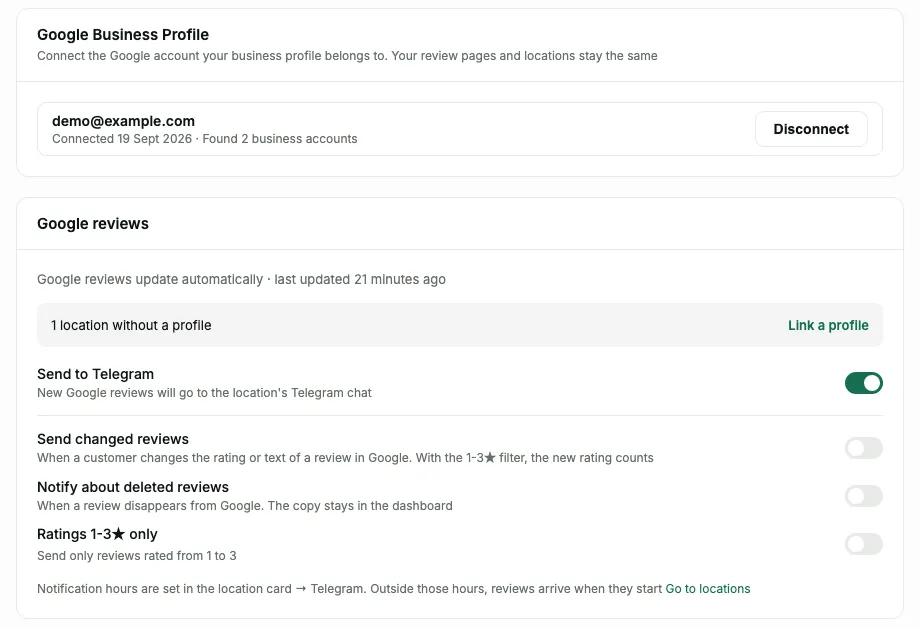
After connecting, the card in the profile's "Google" section shows how many business accounts were found and when you connected. The number of connection attempts per day is limited - if you hit the limit, the dashboard tells you to try tomorrow
Add a location from the profile
The "Create location" button opens the "Add location" screen. If the profile is connected, at the top is the list of locations from the profile, and under it a Google search for a location that isn't in the profile ("Find via Google search"). The locations in the list are split into groups
- "New" - locations that aren't in the dashboard yet. You can tick them one by one or with the "Select all new" button
- "Already in Pochuto without a profile" - locations you added earlier by hand. The import links them to the Google profile, creates no new locations and needs no extra payment
- "Unavailable" - locations that can't be added: "Already added" or "Not verified". A profile that isn't confirmed in Google appears in the list as soon as you confirm it
For locations without a physical address (a mobile service) the dashboard shows "Service area" and the areas, and for closed ones a "Temporarily closed" or "Permanently closed" mark. The mark only informs and doesn't block the choice
On the right is the summary: how many new locations there will be, how many will be linked to existing ones and how many locations on the plan are taken ("N of M"). The button at the bottom is named after the result: "Add 2 locations", "Link 1 location" or, if part goes over the plan, "Add N and pay +X/mo" with the amount of the monthly extra charge
The import is all or nothing. If even one location lacks the right, none is created, and the dashboard says why. So deselect the extra ones and try again
What can get in the way, the dashboard says directly:
- "An active subscription is required to add locations" - without a subscription there are no new locations
- "Link a card to add locations over your plan" - every location beyond the package is a paid slot
- "Your plan has no room for new locations" with a hint on how many more you can add - deselect the extra ones
A location beyond the plan package is a separate slot: $19 a month. The slot is added right away, and it lands in the bill with the next charge: the summary says so - "Slots are added right away, payment comes with the next charge". How slots are counted is in the billing section
After the import, the dashboard shows a toast with the result: how many were added, how many were linked to existing ones and how many were skipped (they are already added or not available in the profile). A skip is not an error - the remaining locations were created. Manual adding through search always stays as a fallback, even if Google isn't connected. A general overview of locations is in the locations section
Link an existing location to the profile
On the card of a location without a profile there is a strip "Link your Google profile for an exact review form link" with a "Link profile" button. The dashboard looks for this location in your profile: if it finds it, it shows "Found this location in your profile", and if there are several candidates it asks you to choose from a list
Before you confirm, you can see what will change: "Now" - the current review link, "Will be" - the link from the profile. If the location's address in the profile is different, the dashboard warns you: make sure it is the same place. The "Link" button links the profile
What doesn't change: the review page, the QR code and links, the accumulated statistics, the Telegram chat. No plan slot is used - the location already exists, and only the source of the review link changes. The dashboard says so directly: "The page, QR code and statistics will not change"
Linking also opens up what isn't available without a profile: after it, the review link comes from the profile, and so do the Google reviews of this location. How many locations are still without a profile is shown by a banner above the list in "Reviews" - "N locations without a profile" and a "Link a profile" link
States and errors
- "This profile is not verified on Google" - the location is in the account, but Google hasn't confirmed the profile. Confirm it in Google, and it will appear among the locations; until then it sits in the list marked "Not verified". How to confirm it is in the article on profile verification
- "This location is already linked to another location" - the location's profile is already linked to another location in your dashboard. Choose another location from the list ("Choose another") or leave this location without a profile
- "Location not found" - this location isn't in the connected Google account, so the profile may be managed by another account. The "Log in with another account" button opens a login with a different email; you can also keep the location without a profile
- All locations from the profile are already in the dashboard - everything in the connected Google account has already been added. If the profile of the location you need is in another Google account, log in with it
- "No profiles found" - the account has no locations you manage. The profile may belong to another account, or you may not have been given access yet: log in with another Google account or add the location by hand
- "Google unavailable" - the locations couldn't be fetched from the profile. Try again in a minute; if it doesn't work, add the location through search - the location is saved, and you connect the profile later
- "Profile access lost" - Google no longer gives Pochuto access, for example because you revoked it in your Google account settings. The "Connect again" button restores the connection. Reviews already imported stay, but new ones don't arrive until access is restored
- "This location is no longer in your Google profile" - choose another location or leave the location without a profile
If Google isn't connected (or was disconnected) while locations are already linked to a profile, a strip stands above the list of locations: "Google is not connected - new Google reviews are not imported" with a "Connect Google" button. If the connection is canceled on the Google screen, the dashboard says "Connection canceled" - connect later, when it suits you
If on the Google screen you cleared the checkbox for business profile access, the connection won't complete: the dashboard shows a toast "Can't connect without access to the business profile" with the hint "Allow access on the Google screen and try again". Nothing is saved, and your Google stays without access for Pochuto. To repeat, tap "Connect Google Business Profile" again (in the Profile card, in onboarding or on the "Add location" screen), choose the account and leave the business profile access checkbox on - without it Google won't let you continue
Importing Google reviews
Public reviews from the Google profile appear in the dashboard automatically, and new ones arrive in the location's Telegram chat. The import works for locations linked to a connected profile. The reviews are in the Reviews section on the "All" and "Google" tabs
A location's first import is silent: all existing reviews appear in the dashboard together, without a "New" mark and without Telegram notifications, so the chat isn't flooded with history. After that, new reviews get a "New" mark and go to Telegram
In the Profile, in the "Google" section, the "Google reviews" card shows that reviews update automatically and the time of the last update. It has several switches. The main two are
- "Send to Telegram" - new Google reviews arrive in the location's Telegram chat. Without a connected chat the notification goes nowhere, and the review stays in the dashboard - how to connect a chat
- "Ratings 1-3★ only" - send only reviews rated from 1 to 3. The switch is available while "Send to Telegram" is on
Two more switches control what else goes to Telegram: "Send changed reviews" (when a customer changes the rating or text of a review in Google; with the 1-3★ filter, the new rating counts) and "Notify about deleted reviews" (when a review disappears from Google; the copy stays in the dashboard). Notification hours are set in the location card, in the Telegram chat dialog: outside them, Google reviews, like complaints from the form, arrive at the start of the next window. A message about a Google review contains the rating, the author and the text - a public review has no phone number. You can't mark such a review as processed with a reaction in the chat: reactions work only for complaints from the form
You can reply to a Google review from the dashboard: on the review page there is a "Reply" button, and the reply is published in Google. For this the profile must be connected and the subscription active - details. A reply from the dashboard sends nothing to Telegram
How to disconnect
Profile → the "Google" section → the "Google Business Profile" card → "Disconnect", then the confirmation "Disconnect Google Business Profile?". Pochuto stops storing access to your Google account and revokes it, unless this Google account is connected to another dashboard
Review pages and locations don't change. You can connect the profile again at any time; after disconnecting, new Google reviews aren't imported, and a "Google is not connected" strip appears in the list of locations. You can also revoke access in Google itself - then the dashboard shows "Access to the profile lost" with a "Connect again" button
FAQ
- Does Pochuto change anything in my Google profile?
- No. We read the profile - locations, hours, the review link and reviews - but edit nothing in it
- What happens to the page and QR code if I link an existing location to the profile?
- Nothing. The review page, QR code and statistics stay as they were, and no plan slot is used. Only the source of the review link changes: it now comes from the profile
- Why isn't my location in the list?
- Most often the profile isn't confirmed in Google, or it is managed by another Google account, or the location is already added to the dashboard. In every case the dashboard explains the reason, and you can still add the location by hand through search
- Does adding locations from the profile cost anything?
- How many locations are included depends on the plan, and each one beyond the package is a paid slot. Locations already in the dashboard are linked to the profile free of charge. The summary before you confirm shows how much will be paid each month
- Will Google reviews appear in the dashboard right away?
- After the first import of the location, with no Telegram notifications about old reviews. New reviews then update automatically
- What should I do if the dashboard says access to the profile is lost?
- Tap "Connect again" in the profile card or in the strip above the list of locations. Reviews already imported don't go anywhere