Custom domain: your review page on your own address
By default the review page lives on pochuto.link. A custom domain gives you your own address - for example reviews.mybiz.com - and you can set it on any page of the account
Why you need it
There is one entirely practical reason: the customer sees the address. They see it under the QR code on the table, in the browser bar after scanning and in the messenger when you send a personal link. Someone else's domain name reads at that moment as an outside service, your own as your website
The other side is trust in the link itself. A person who gets an address in an SMS with the name of a place they know opens it more willingly than an address they see for the first time
Connecting a domain is not required: without it everything works the same, just on the pochuto.link address. It is a matter of looks, not of working
Which domain fits
Both a domain and a subdomain fit. A subdomain is almost always better - for example reviews.mybiz.com or feedback.mybiz.com: the main domain stays with your website, and the review page gets its own address without getting in its way. If you enter a root domain, the dashboard points out that most registrars don't allow a CNAME record on the root and suggests a subdomain
Enter only the domain in the field - no "http://", no path, port or spaces. The dashboard checks this right away and hints at the format if the address is entered differently
You need a domain that you control. You will have to add a DNS record at your registrar - without access to the domain's settings you can't connect it
How to connect: one CNAME record
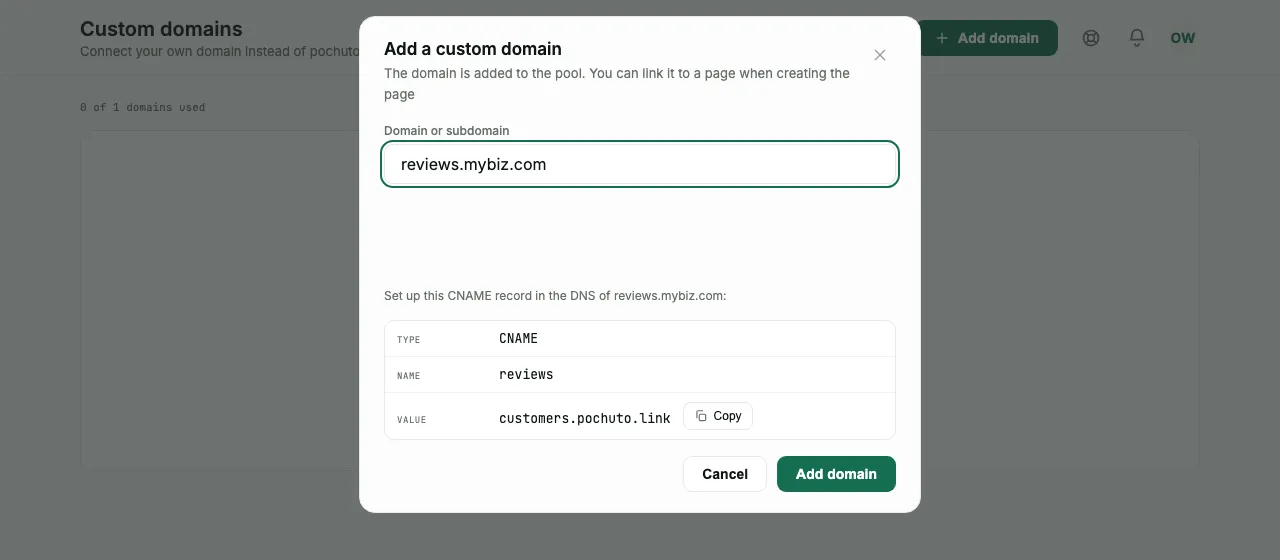
The "Custom domains" section → "Add domain". The dashboard immediately shows the record you need to add to your domain's DNS
| TYPE | NAME | VALUE |
|---|---|---|
| CNAME | your subdomain, for example reviews | customers.pochuto.link |
This record is added in your domain registrar's panel - where you bought the domain, not in Pochuto. You can copy the value with the button next to it so you don't have to type it
The SSL certificate is issued automatically - you don't need to buy or upload anything. It appears on its own as soon as the domain starts pointing to Pochuto: while the certificate is being issued, the card says "we are issuing the SSL certificate", and this usually takes a few minutes
The "Awaiting verification" state
Right after you add it, the domain has the "Awaiting verification" status. This is a normal state, not an error: we are waiting for the CNAME record to spread through DNS
DNS can take up to 24 hours to update. Most often it is a few minutes, but they can't be promised - the time depends on your registrar, not on us. If the status hasn't changed after a day, the problem is almost certainly in the record itself
The domain card shows the time of the last check, and the "Check again" button runs it manually. There is a one-minute pause between manual checks - the dashboard shows when the next one becomes available. While the domain is awaiting verification, the dashboard checks it by itself too: first every few minutes and then less and less often, so you can simply leave the tab open
There are only three statuses: "Active", "Awaiting verification" and "Verification error"
If verification doesn't pass
The dashboard doesn't stop at the word "error" - it names the cause, because whether it is your job or ours depends on it:
- The record is missing, points elsewhere or hasn't spread yet - the most common case. Check the CNAME at your registrar: the value must be exactly customers.pochuto.link, and after fixing it wait a few minutes and press "Check again"
- The CNAME points to a name that doesn't exist - the record's value doesn't match the one shown in the domain card
- The address was found, but the server doesn't respond - check the CNAME and whether a firewall or Cloudflare settings block access
- The domain points to a different server - remove the old A and AAAA records of this name
- The certificate wasn't issued - traffic reaches us, but SSL never appeared. Check that the CNAME isn't overridden by A or AAAA records of the same name
- A CAA record doesn't allow issuing the certificate - add a CAA record in DNS that permits letsencrypt.org, or remove the restriction
- The domain is on Cloudflare with the orange cloud - choose the SSL/TLS mode Full in Cloudflare; Flexible works too, but requests between Cloudflare and Pochuto go unencrypted, so we don't recommend it
- Invalid domain name - it can't be checked: delete the domain and add it again
A typical mistake is adding the record to the wrong name. If you are connecting reviews.mybiz.com, then at the registrar the record name is reviews, not mybiz.com and not www
How a domain gets onto pages
A domain is added to the account's pool, not to a specific page. You can link it to a page when creating it or later - the page editor has a domain choice. Changing the domain of an existing page can break links, QR codes and NFC tags shared earlier, so the dashboard asks for confirmation before saving
The domain card shows how many pages it is already used on - handy when you have several pages and two domains
One custom domain is already included in the subscription. Each further domain costs +$3/month and is added to the next subscription payment - there is no separate charge at the moment of purchase. If you already have more domains connected, they are kept (about slots and plans)
Deleting a domain
Deleting returns all the pages that used it back to pochuto.link. The dashboard warns about this in the confirmation dialog
QR codes and links already printed with the old domain will stop working. This is the main reason not to change a domain back and forth: a sticker on a table doesn't find out about a change in the dashboard
If the slot was bought separately, when deleting you can immediately tick "Stop paying for this slot from the next charge" - otherwise it stays paid for
FAQ
- Do I have to connect my own domain?
- No. Without it the page works on pochuto.link in exactly the same way - a custom domain is needed only for how the address looks
- Do I need to buy an SSL certificate?
- No, the certificate is issued automatically after the domain is successfully verified
- Why has my domain been waiting for a day already?
- DNS updates for up to 24 hours, but if that time has passed, the problem is in the record itself. Check that the CNAME is added to the right subdomain and its value is customers.pochuto.link, and press "Check again". The domain card names a specific cause - start with it
- How many domains can I connect?
- One is included in the subscription. Each further one is +$3 a month, and you can add it only with an active subscription
- What happens to old QR codes if I delete the domain?
- They stop working: the pages return to pochuto.link, while a printed code leads to the old address