Telegram notifications: where reviews arrive
A review you find out about a week later is a review you can no longer answer in time. A Telegram chat turns it into a message that arrives right away
Why connect a chat
The whole value of the private form is speed: the customer left unhappy five minutes ago, and right now the situation can still be fixed. A Telegram chat is the only channel that delivers the message immediately
While no chat is connected, the notification goes nowhere. The review is not lost - it is saved in the dashboard, in "Reviews" - but you will only see it when you open it yourself
A chat is connected separately for each location. This is on purpose: in a chain, a review from one site should not get lost among messages from another, and the manager of a particular cafe sees only their own
How to connect
Location menu → "Telegram chat". This item is in two places: on Overview, in the "Your locations" table, and on the "Locations and pages" screen, in the card menu. The dashboard asks where to connect notifications and offers two options
- Group - a regular team chat. The bot is added in one click: Telegram opens, you pick the group, and that's it
- Channel - one-way posts. Good when many people read the notifications but there is no need to discuss them there; you can turn on comments for the channel inside Telegram if you like
A channel takes longer to connect than a group - not one click but three steps, which the dashboard shows as instructions: first activate the bot with the /start command in a private chat (otherwise it will not show up when you search for channel administrators), then add it as a channel administrator with two permissions - "Post Messages" and "Change Channel Info" - and finally post the generated command in the channel. As soon as the bot sees it, the window moves on to choosing notification hours by itself
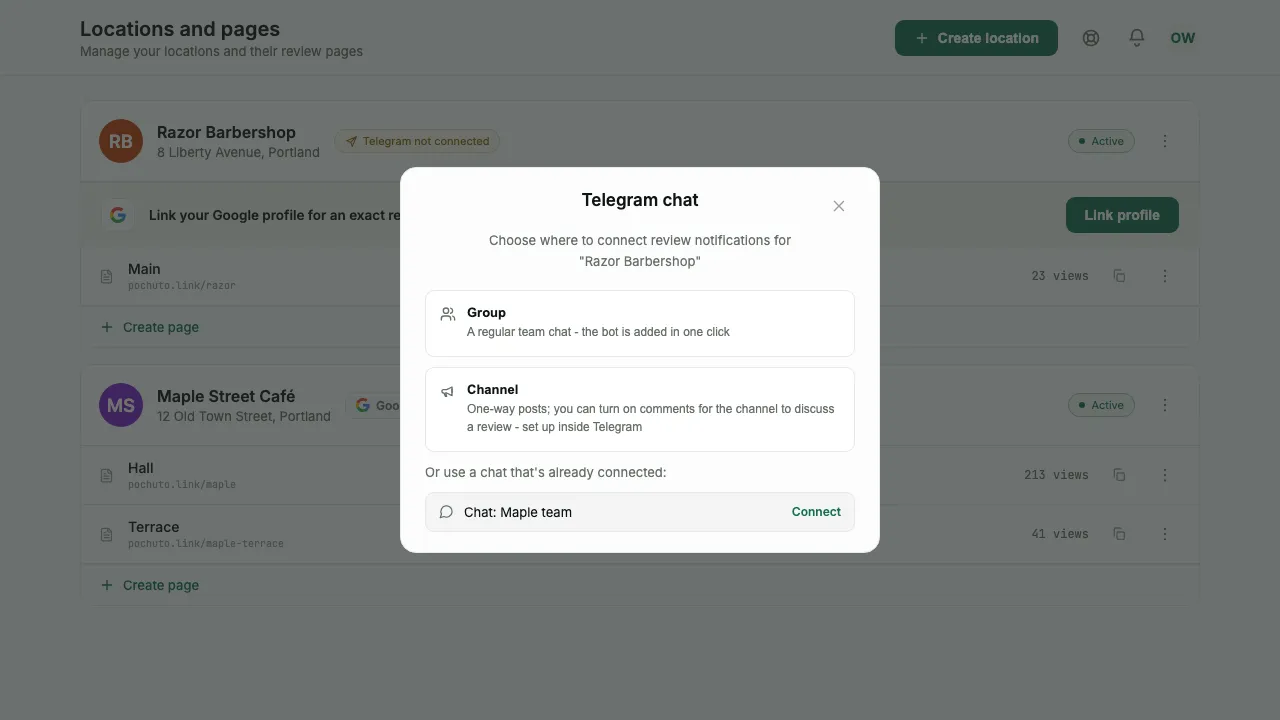
If the chat is already connected to another location, the dashboard offers to reuse it - you do not have to create a separate chat for each site. This is handy when one person runs all the sites
Notification hours
Right after connecting, the dashboard asks you to choose when to send reviews for this location to Telegram. The default is "Around the clock": every review arrives right away. "Working hours only" limits notifications to the hours you set, for example 09:00 to 21:00
Reviews that arrive outside this window are sent at the start of the next one - right after it opens, usually within a few minutes. If there are two or three, a short message with their number comes first, then each review separately, with the time it was actually left. If more than three piled up, they arrive as one summary "New reviews: N": up to ten lines (rating, name, an "Open" link to the review in the dashboard), and the rest as a line "and N more in the dashboard"
If the location is linked to a Google profile, choosing "Working hours only" fills in the opening hours from the profile automatically and marks them "Per your Google schedule". If the profile says the place is open around the clock, "Around the clock" stays. You can change the filled-in hours, and the mark disappears after you edit them; without a profile the default is 09:00 - 21:00
In the dashboard, in "Reviews", a review appears right away, regardless of notification hours. If you process it there first, the message in the chat arrives already marked as processed
The window can cross midnight - for example, 18:00 to 06:00 for a place that works at night. You can change the hours at any time: location menu → "Telegram chat". The hours are counted in the location's time zone, which is shown next to them as "Time zone"
Which messages arrive
- New review - the text from the private form, the rating and, if the customer came from a tag, its name
- The customer wants to be contacted - a separate message when the customer left a phone number on the hold screen. This is the most urgent of everything that arrives
- The customer went to Google without confirming a contact - a warning that an unhappy customer went off to write publicly
- The customer gave a high rating, but the page is not set up - a signal that the location has no review link, so a high rating leads nowhere
- New Google review - the Business plan: the rating, author and text of a public review from your Google profile. Such a review has no phone number. Turned on in Profile, in the "Google reviews" card, which also has the "Ratings 1-3★ only" switch; for the import, see the section on Google Business Profile
- The domain no longer works - a warning that your custom domain stopped pointing to Pochuto: the CNAME record changed or the domain expired
If more than three Google reviews come in within 10 minutes, the first three arrive separately and the rest as one summary "New reviews: N". This does not apply to complaints from the form: during working hours they arrive right away and separately
If the customer sent the form without text, the message contains the line "No comment" - the rating itself is the whole review. Long text is shortened, and the message says so directly; the full text always stays in the dashboard
Why the customer's contact does not reach other chats
The customer's name and phone number arrive only in your chat - the one you connected to your location. They are never passed to any internal Pochuto chat, not even in masked form
The reason is simple: the contact exists for exactly one purpose - so that you can call back the person whose complaint did not go to the public profile. No other recipient needs it to do their job
That is why, when no chat is connected, the review is not forwarded anywhere else: the only addressee for this data is you
A reaction in the chat and the "processed" status
You can link a reaction to a message with the review status in the dashboard: put a reaction in the chat and the review is marked as processed. For this to work, the bot must be a group administrator, and one permission is enough - "Change Group Info"
Do not count on this in channels: Telegram delivers reactions to channel posts anonymously and with a delay. If statuses matter, connect a group, not a channel
A reaction works only for complaints from the form. A message about a Google review cannot be marked as processed with a reaction: mark it in the dashboard, with the "Mark as processed" action
You can get back to the message from the dashboard: in the review Details there is a "Telegram" row with an "Open in Telegram" link (it opens in a new tab). The link appears only when the message was delivered on its own to a supergroup or channel: a regular group gives no public link to a message, and a line from a summary has no link because one message holds several reviews
How to make a group a supergroup so the "Open in Telegram" link appears
Telegram gives a link to a message only for a supergroup. A regular group becomes one when visible chat history, a public link or topics are turned on in it. The easiest is chat history, and it is done in Telegram itself
- Open the group in Telegram and go to "Group Info"
- Tap "Edit"
- Choose "Chat history for new members" and set it to "Visible"
You do not need to reconnect the chat in the dashboard. Telegram itself turns the group into a supergroup, and Pochuto notices this and updates the link. Item names may differ depending on the Telegram version: look for the chat history setting in the group's edit section
Disconnecting and replacing a chat
You can disconnect the chat from the same window: once a chat is connected, instead of the choice between a group and a channel it shows a row with the chat name and a "Disconnect" button, and below it the notification hours. The caption under the chat name shows whether it is a group or a channel and when it was connected (for links made before October 4, 2026, just "Connected"). The "Disconnect" button first asks for confirmation: "Disconnect the Telegram bot from this location?"
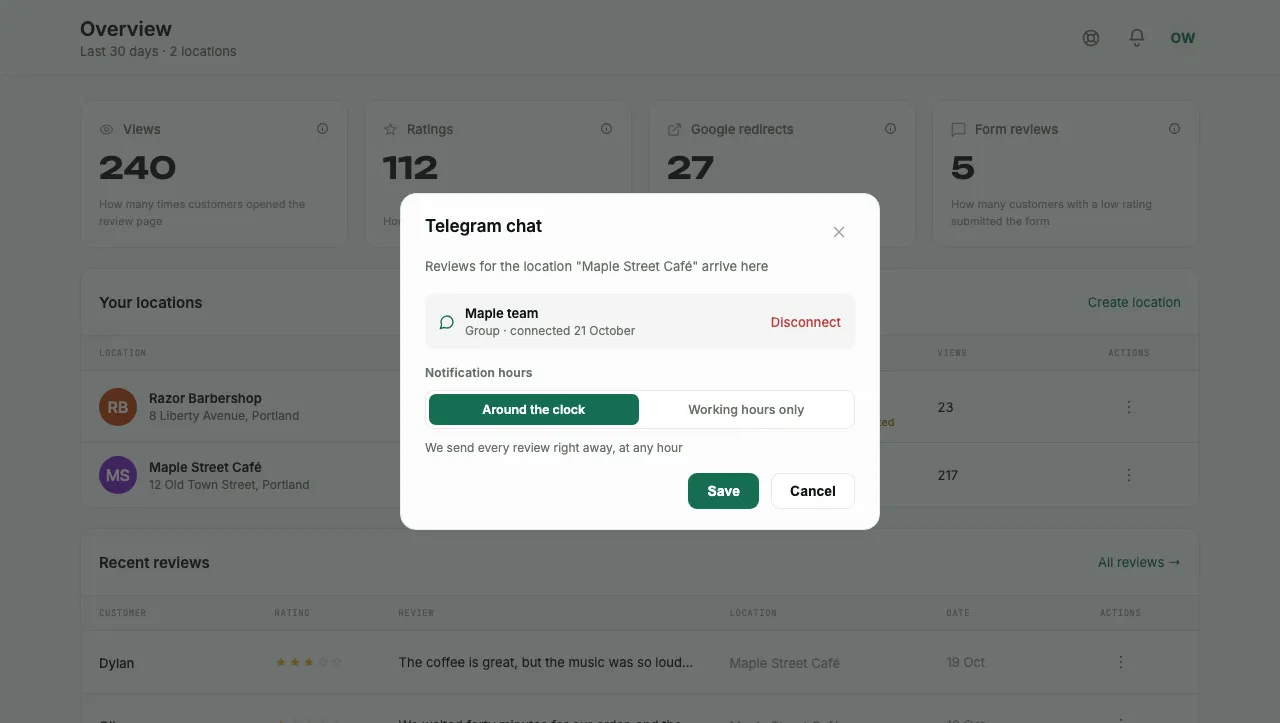
Before disconnecting, a message "Chat disconnected from location" with the location name arrives in the chat itself - so nobody in the chat wonders why the notifications stopped. After disconnecting, review notifications for this location stop arriving, and the history in the dashboard stays untouched
To replace a chat, first disconnect the current one, then connect the new one - there is no separate "move" button
Frequently asked questions
- Can I stop getting notifications at night?
- Yes. Choose "Working hours only" in the Telegram chat window: reviews outside these hours arrive at the start of the next window, and in the dashboard they are visible right away
- Why are no messages arriving?
- The most common reason is that the chat is not connected to this particular location: the connection is made for each site separately. Check the location card - it shows a mark that Telegram is not connected
- Can I receive reviews from all locations in one chat?
- Yes. When connecting, the dashboard offers chats already in use as a list, so one chat can be linked to several locations
- Will the team see the customer's phone number?
- Yes, if the customer left it: the contact arrives in your chat so there is someone to call back. You decide who to add to that chat