How it works for the customer: from rating to review
A customer scans the QR code and within a minute either leaves a review on Google or writes to you directly. This document shows every screen they will see - including what happens when the link is opened inside a messenger
How a customer reaches the page
The page opens in three different ways, and the customer sees almost the same thing each time - the difference is in what the page itself knows about them
- The page's general link - from a QR code on a table, a sign or a message. The page doesn't know who has arrived
- A personal link like /r/… - you created it for a specific customer; if personalization is on for the page, it greets the customer by name, and if not, it looks like a regular page
- A tag link like /q/… - the same QR code, but from a separate spot (a table, a display case), so you can later see in the statistics where a review came from
If the page has been deactivated or deleted, the customer sees "Page not found" with the explanation "The link may be out of date or the page may have been deleted" - not an empty screen or a browser error
Step 1. The rating
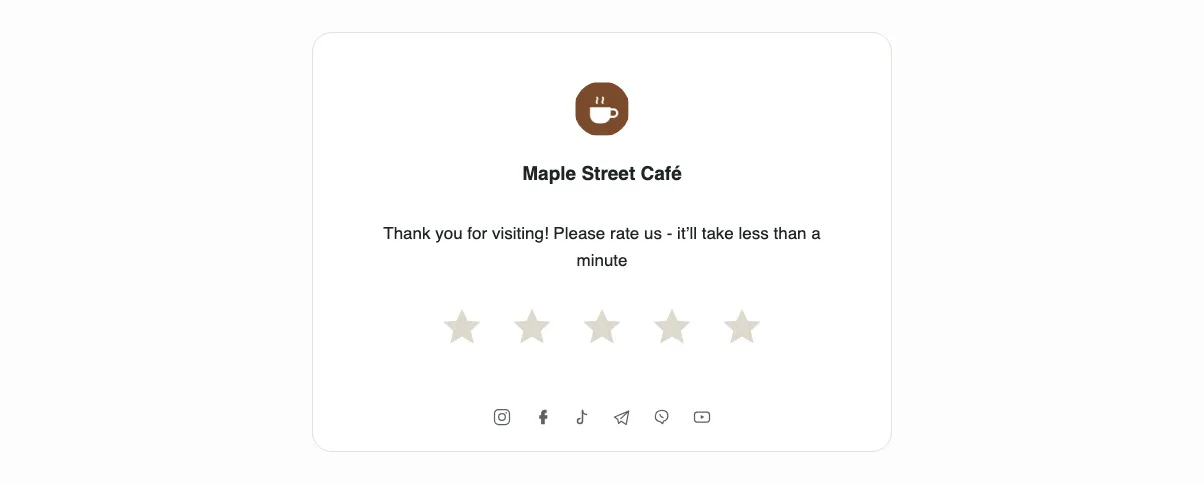
The first thing the customer sees is your business name, the logo and the line "Thank you for visiting! Please rate us - it’ll take less than a minute". Below it are five stars
A rating takes one tap - no fields, sign-up or consent. That is exactly why the funnel works: the fewer steps before the first action, the more people take it. The stars are also available from the keyboard: use the arrow keys to choose, and press Enter or the Space bar to confirm
Step 2a. A high rating leads to Google
If the rating equals the threshold or is higher, the customer goes to Google. In a regular browser this happens on its own: the stars disappear, a line "Let’s open the Google reviews page…" takes their place, and the Google page opens without a single tap
Inside a messenger an automatic jump isn't always possible (the next section explains why), so there the customer usually sees "Thank you for your kind words!" and a "Write a review on Google" button with the hint "On the Google page, please write a few kind words". The exception is Instagram, Threads and Facebook on iPhone: instead of this screen, a hint on how to switch to the browser appears right away, and there is no button
If the location has no review link, the customer sees the thank-you without a button - there is no dead end, but a high rating leads nowhere. This is the most expensive unfinished setting in the product: check the link in the location
This is how the default "Straight to Google" mode works. If a different redirect mode is chosen in the page editor, one more step appears before Google - the next section covers it
If the page asks for text first
In the "Text first" and "Text and hint" modes, after a high rating the customer sees "Thank you for your kind words!", the explanation "Write a few words - we'll copy the text, and all you'll need to do is paste it on Google" and the field "What did you like?". The "Go to Google" button copies what was written to the clipboard and moves on
The field is optional - the line under the button says so: "No text needed - the button will still open Google". An empty field copies nothing and leads to Google just like the default mode
If the text was copied, in the "Text first" mode the customer sees "Text copied" with the hint "On the Google page, add your stars, tap the field and choose "Paste"" and their own text once more. In a regular browser Google opens by itself after a few seconds ("Opening Google…"), in a messenger - with the "Open Google" button. The exception is Instagram, Threads and Facebook on iPhone: there, as in the default mode, a hint on how to switch to the browser appears right away
In the "Text and hint" mode, a "What to do in Google" screen appears instead: a short animation on a diagram of the review form shows two steps - give as many stars as the customer gave you, and paste the text into the field. The "Open Google" button works from the first second, and in a regular browser a bar on the button counts down 15 seconds to the automatic jump. On iPhone in Instagram, Threads and Facebook, the same 15 seconds open the hint on how to switch to the browser
Some browsers don't allow automatic copying. Then in the "Text first" mode the customer sees "Copy the text manually" with the hint "We couldn't copy it automatically - press and hold the text and choose "Copy"" and the text itself, selected for copying, while in the "Text and hint" mode the same text and the line "Copy the text manually" appear on the screen with the animation. There is no automatic jump in this case in either mode: the customer goes to Google with the button once they have copied the text
The text the customer writes is not stored by Pochuto and not passed to the dashboard - it is meant for Google and lives only in the clipboard of the customer's device. In the dashboard, only complaints from the private form remain, as before
Step 2b. A low rating opens the private form
A rating below the threshold doesn't lead to Google at all. Instead the customer sees "We’re sorry that something went wrong. Please tell us what happened – we’ll be sure to look into it" and a form: the review text, plus a name and phone number if you left those fields on
After sending, the customer sees "Thank you! Your review has been sent". This text reaches you in Telegram and is saved in the dashboard; it doesn't appear in your public Google profile
If the customer still wants to write on Google
Under the form there is a link "I’d still like to leave a review on Google" - it is visible unless you turned it off in the page settings. Tapping it doesn't lead to Google right away: first the customer sees one more screen
"Please give us a chance to respond" with the explanation "We will get in touch with you to sort out the situation" and three options: leave a phone number ("Yes, please get in touch with me"), go to Google anyway, or go back to the form
This isn't a trap but a last attempt to talk: both roads stay open, and the "Why not leave a review on Google?" button doesn't go anywhere. If the customer leaves a phone number, they will see "Thank you! We’ll be in touch shortly", and you will get a notification marked as a customer waiting for a call
Why you sometimes have to tap "⋯"
The owners' most common question. When a customer opens the link directly in Telegram, Viber or Instagram, the page loads in the app's built-in browser, not in Safari or Chrome. That browser has no shared login with Google - the customer there is either not logged in or can't leave a review at all
Pochuto tries to get out of it on its own, and what the customer sees depends on the phone:
- Android - the page hands the jump over to Google Maps, then to Chrome or another browser. If Maps takes the link, the review form opens right in the app, otherwise in the browser; if neither works, the customer sees a screen with a button to copy the link
- iPhone, Telegram and Viber - we first try to open Safari automatically; if that fails, a hint appears
- iPhone, Instagram, Threads and Facebook - we don't try an automatic exit at all: these apps don't allow it, so the hint appears right after the rating
If the customer wrote text before this, the hint and the Android screen show it again under the heading "Your text" with a separate "Copy text" button. The link-copy button replaces the text in the clipboard, so a reminder sits next to it: "The link will replace the text in your clipboard - if you copied it, come back and copy the text again"
On iPhone the hint is called "Almost done!" and shows exactly two steps for the app the customer is in: in Telegram - "Tap ⋯ in the top right-hand corner", then 'Select "Open in Safari"'; in Viber the same, but the corner is the bottom one; in Instagram and Facebook - 'Select "Open in an external browser"'. This is the last screen on iPhone: from here the customer either follows the hint or taps the copy-link button right in it
Android has its own final screen: if no attempt got the customer out of the page, "Open in your browser" appears with a link to copy and an explanation of where to paste it. So there is no dead end in any case - the last screen is just different on Android and iPhone, and the path inside a messenger is always longer. That is why a QR code on a table converts better than a link in a chat
What else the customer sees
- A logo, or a monogram made from the name if no logo is uploaded
- A greeting by name and the employee's signature - only on personal links and only when page personalization is on
- Social network icons in the footer, if you added links
- The page in the language you chose: Ukrainian, and on the Start plan also English, Spanish or Polish
FAQ
- Does the customer need to sign up or install an app?
- No. The page opens in the browser, and a rating takes one tap. A Google account is needed only on Google's side, if the customer decides to write a public review
- A customer says the page didn't open in Google. What happened?
- Most likely they opened the link inside a messenger. There the page shows a hint on how to switch to Safari or Chrome - without that, Google doesn't see that the customer is logged in
- Will the customer see that their rating was filtered?
- No. A low rating opens the form as an ordinary next step, and the Google link stays in view unless you turned it off
- Can I see the text a customer wrote before going to Google?
- No. Pochuto doesn't store this text - it is copied to the clipboard of the customer's device so they can paste it into Google. You can see it only in the review itself on Google, if the customer publishes it
- How long does the whole path take?
- The rating takes seconds. If the customer writes a review on Google, the rest is up to them; the private form takes under a minute