Quick start: your first location and first review page
From sign-up to a ready QR code for your table takes four steps, and none of them needs technical knowledge. This page walks you through all of them
Step 1. Sign up
Sign up with an email and password, or log in with Google. You don't need to confirm your email: the dashboard opens right away, and you can add your first location the same minute
Step 2. Connect your business from Google
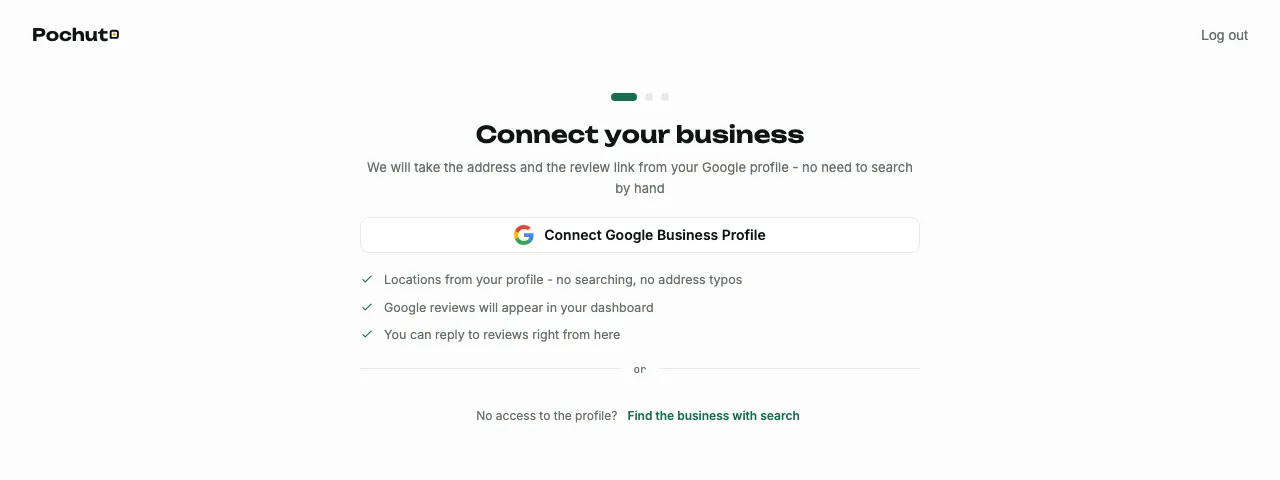
The first onboarding screen offers to connect Google Business Profile: the dashboard shows the locations from your profile, and all that's left is to choose the right one. The location you choose brings its name, address and review link with it - you don't need to type them in. More about connecting a profile in Google Business Profile
No access to the profile, or your location isn't visible in it? Under the connect button there is a "Find the business with search" link - a search by name, like in Google Maps. If the location isn't there either, you can enter the name and review link by hand. Without a connected profile, Google reviews are not imported into the dashboard - you can connect it any time later, and the location will be saved
Step 3. Your first review page
Before creating the page, the dashboard shows a "Check your details" screen - the name, address and review link of the location you chose. You can change all of it later. The "Next" button creates your first review page - the one a customer sees after scanning the QR code or opening the link. You can deal with the high-rating threshold, the theme and other details later, in the review pages section
Step 4. Your link and QR code are ready
The last onboarding step hands you a ready link and a QR code for it. You can paste the link into your Google profile, a sign or a message to a customer; print the QR code and put it on a table, at the till or in the waiting area
Don't crop the white margin around the QR code and don't shrink the image until it blurs - without the margin, or on a blurry raster, a phone camera won't recognize the code. For large prints (a poster, a sign) download the SVG - it stays sharp when scaled
Where to send customers
- A QR code on a table, at the till or in the waiting area - for people who are on site
- A personal link for a specific customer (SMS, Telegram, a messenger) - see the "Personal links" section
- A named sign or sticker at several spots in one location - see the "QR codes and tags" section
FAQ
- How long do sign-up and the first location take?
- Up to five minutes in total: the sign-up form, the location search in Google and the ready link all appear without any extra confirmations
- Can I add several locations at once?
- Onboarding takes you through the first location. You add the second and later ones from the dashboard: locations from a connected Google profile can be added several at a time, or you can find and enter a location by hand - the "Locations" section describes this in detail
- What if my business doesn't have a Google profile yet?
- You can create a Google Business Profile for free at business.google.com, and then find it in the Pochuto dashboard with the same search