Deleting an account: what stops and what can be restored
Deletion is neither instant nor irreversible: review pages stop opening right away, but the account itself can be restored within 14 days - after that the data is erased permanently
First - do you really need to delete
Deleting an account is the bluntest tool, and most often it is not what you need. What solves the same tasks more gently:
- You do not want to pay anymore - it is enough to cancel the subscription: access lasts until the end of the paid period, and the data stays
- You need to remove one page - it can be deactivated in the editor without touching the rest
- You are worried about someone else's access - the extension and bot chats are revoked one by one, and the password is changed
What happens right away
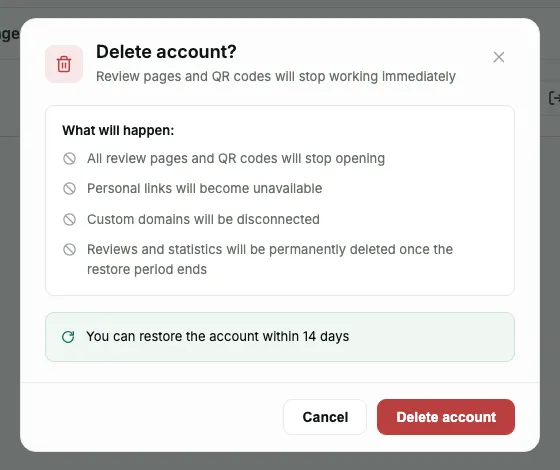
The button is in Profile, in the "Danger zone" section (on a phone, in the list of sections, the last row). The confirmation window lists the consequences before you press, and the main one is in the title itself: review pages and QR codes stop working right away
- All review pages and QR codes stop opening
- Personal links become unavailable
- Custom domains are disconnected
- Reviews and statistics will be permanently deleted - but only after the restore period ends
- Connections to YouTube, Instagram, Facebook and TikTok are removed at the final deletion: tokens are deleted and access is revoked on the platform's side
- The Google Business Profile connection is revoked in Google at the final deletion, not right away - unless this same Google account is connected to another Pochuto dashboard
This applies to what is already printed. A sticker on a table, a business card with a QR code, a link in a social media profile - all of it starts leading nowhere that very minute, not at the end of two weeks
The restore window - 14 days
The account is not erased right away. For 14 days, logging in to the dashboard takes you not to the dashboard but to the "Account deleted" screen, which explains that the data is still saved, and has a "Restore account" button
The screen shows how many days are left, and on the last day it says so: "Today is the last day you can restore your account". After that it is permanent, with no way to restore
To restore the account, log in the same way you did before - with the same email or through Google: the button is behind the login, not before it. An email about the deletion also arrives at the account's email
What comes back after restoring
Pages that the deletion itself turned off turn back on together with the account - along with domains, links, reviews and statistics
Two things do not turn back on by themselves. First, a page you turned off manually before the deletion stays off - the dashboard has no reason to think you changed your mind. Second, subscription auto-renewal stays off: deleting the account turns it off, and restoring does not bring it back. You have to turn it back on yourself, on the subscription screen, and in time before the already paid period ends - after that there is nothing left to renew, and you have to start a subscription anew
The second point is the easiest to miss, and the price of the mistake is in the timing: the account works, everything is in place, and the fact that the next charge simply will not happen is discovered only after the paid period has run out - that is, when the "resume subscription" button is already gone
What happens to the subscription and the money
Deletion turns off auto-renewal but does not cut short the already paid period - the same mechanism works as in an ordinary subscription cancellation. There will be no new charges
Deletion does not start an automatic refund. If it is about money for the current period, that is a separate request to support under the procedure from the public offer - and it has to be submitted before this period ends, that is, without putting it off (terms)
Frequently asked questions
- Can I get the account back after deleting it?
- Yes, within 14 days. Log in with the same email - instead of the dashboard, a screen appears with the restore button and the number of days left
- Will review pages work during those 14 days?
- No. They stop opening right after deletion - the restore window concerns the account's data, not the availability of pages to customers
- Will the subscription come back after the account is restored?
- The account itself comes back, and auto-renewal stays off - it has to be turned on separately on the subscription screen before the paid period ends. After that you will have to start a subscription anew
- Will the money for the paid month be refunded?
- Deletion does not start a refund. It is a separate request to support, and it has to be submitted before the paid period ends - the procedure is described in the public offer
- How do I delete the data received from Facebook, Instagram, TikTok or YouTube?
- In Profile, in the "Social media" section, press "Disconnect" in the network's card: the token is deleted and access is revoked. All connections are also removed at the final deletion of the account. If you cannot log in, write to hello@pochuto.com from the account's email
- I just do not want to pay - do I need to delete the account?
- No. Cancel the subscription: access lasts until the end of the paid period, and pages, QR codes and data stay in place
Connected social networks: YouTube, Instagram, Facebook and TikTok
From connected social networks Pochuto stores only what is needed for publishing: the identifier and name of the channel, Facebook page, Instagram account (connected without a page) or TikTok account, a copy of the profile image and the access token in encrypted form. The token exists only while the connection is active. We do not read or store the content of your account on these networks, its posts, comments or messages
This data can be deleted in two ways. By yourself, right away: in Profile, in the "Social media" section, press "Disconnect" in the card of the network you need (for Facebook, in the row of the page; for Instagram without a page, in its row) and confirm. The token and the image copy are deleted, and access is revoked on the platform's side; for Facebook, after the last of your pages is disconnected; for Instagram without a page, if the business portfolio is no longer connected to Pochuto, we ask Meta to revoke access, and you can reliably remove it yourself in the Meta business portfolio settings: remove access for Pochuto. Or by the final deletion of the account: when the restore window ends, all connections are removed the same way and the tokens are deleted
Videos that are already published stay on the platforms: you delete them yourself in YouTube, Instagram, Facebook or TikTok. While the account is in the restore window, the connections are kept, but publishing does not run
Cannot log in to the dashboard? Write to hello@pochuto.com from the account's email and say which networks' data needs to be deleted. We will remove the connections and delete the tokens. You can also revoke access in the platform itself: in the settings of Facebook, Instagram, TikTok or your Google account, in the section about third-party apps. For Instagram connected without a page, access is revoked in the Meta business portfolio settings: remove access for Pochuto there